
FAQ - Importing from SigaBill
Why do imported invoices continue to appear on the Invoice Import sheet?
Invoices remain displayed until the entries for these invoices have been generated. Entries are not generated automatically upon import. The user must click the "Generate entries" button.
How do I correct an imported invoice?
The information shown comes from SigaBill. It is therefore not possible to correct the amounts proposed for this invoice.
If corrections are necessary, you will need to:
a. Generate the entry for the incorrect invoice
b. Delete the incorrect invoice in SigaBill
c. During the next import, import and generate the entry for the cancellation invoice
In Entry Input, I cannot see the entries coming from SigaBill. How do I display them?
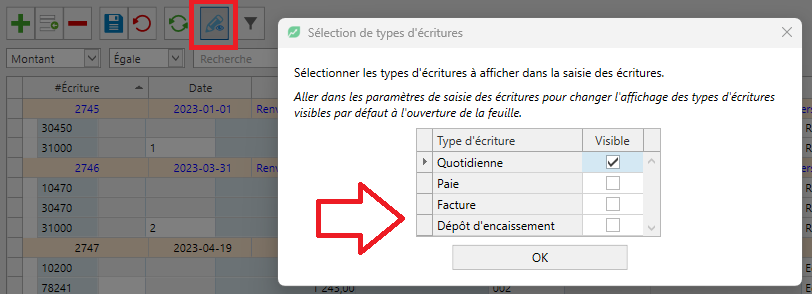
If the imports have been completed and the entries have been generated, it is likely the display filter in Entry Input that is preventing the Invoicing entries from being viewed. To change this filter:
• Go to Entry Input
• Click on the Entry Types icon
• Check the Invoice and Deposit type
• Click the OK button
Why are billed quantities not being posted?
In order for quantities to be imported into accounting, all of these criteria must be met in SigaBill:
1. An unit has been defined in the Product (or Service)
2. A conversion factor for the unit has been specified in the Product (or Service)
3. The Product and Service Category linked to this Product contains a Compilation unit
Changes will be applied to future invoices. Changes are not retroactive... However, if invoices were imported without quantities, to resolve the situation, it is suggested to create an entry in Entry Input with quantities only (to complete the import coming from SigaBill).