
FAQ - Adjustments
I am trying to generate my adjusting entry and an error message appears. Why?
The error message is displayed to inform the user that the Debit-Credit amounts do not balance. For an entry to be generated, these columns MUST balance!

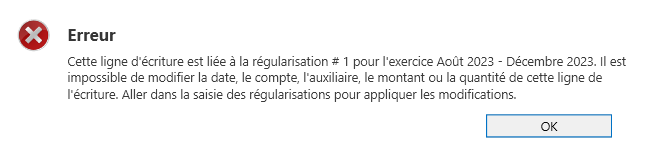
I want to correct the adjusting entry but this error message appears. How do I do this?
Corrections to adjusting entries can be made by returning to the Adjustments table and not directly in the entry generated by the software. To learn the steps for correcting an adjustment, refer to the section "Modify an adjustment
I have completed the adjustments. What should I do now?
Once the adjustments have been entered and the adjusting entries have been generated, it is suggested to cross-check the software results with the accountant's results. As soon as everything matches, all that remains is to close the fiscal year concerned. Everything related to this fiscal year will remain available for viewing and printing reports, but no changes can be made.
I do not see the fiscal year in the list of available fiscal years for entering Adjustments. Why?
The fiscal year is probably closed. The fiscal years displayed are "open" fiscal years. It is possible to reopen a closed fiscal year via the Accounting menu, Fiscal years button.
Which columns should be used to enter Adjustments?
Adjustments provided by the accountant can be presented in different ways. Depending on the method chosen, the user can adapt their workflow with the Adjustment Entry tool to achieve the desired result. For adjustments presented as a spreadsheet or adjusted trial balance, it is suggested to use the "New balances" columns. For adjustments presented as journal entries, it is preferable to use the "Corrections" columns.
The debit-credit balances do not match, but I need to stop my work in the Adjustment entry screen. Will the entered amounts be lost?
No, it is possible to save the amounts in the Adjustment Entry window even if the debit-credit balances do not match. However, it will be impossible to generate the adjustment entry.
I used to generate adjustments in SigaFinance for a long time. Now that I'm using EVO, I can't see the adjustments generated in the previous version…
The adjustment entries displayed in the "Adjustment Entry" window are the entries generated by EVO. Adjustments that were generated in previous versions of SigaFinance are part of the regular entries in Transaction Entry but are not linked in the "Adjustment Entry" window.
My accountant offers to enter the adjustments into my accounting software himself. Is this possible?
Yes, it is possible to provide the accountant with a backup of the company data so that they can post adjusting entries. In this case, the user must stop working in the SigaFinance evo software while the accountant enters the adjustments. Once the work is complete, the accountant will return a backup file containing the adjustments to the user. This file must be restored by the user via the Home / Restore / Data Restoration menu. Once the restoration is complete, the user can continue their work in SigaFinance evo.
I entered the amounts in Adjustment Entries, but when I view the reports, it seems like the adjustments have no effect. Why?
The entries must be generated for the adjustments to affect the accounting. You should also check if the correct financial year is selected.
According to the adjustments provided by the accountant, I am missing some accounts. Can I add them while completing the adjustment in EVO?
Yes. The chart of accounts and sub-accounts are available at all times. It is recommended to save the current adjustment before accessing the Chart of Accounts menu, Accounts (or Sub-accounts) button. Once the account (or sub-account) is added, it will be available in the account list for the Adjustment. If it does not appear, make sure that the "Show zero balance account (or sub-account)" button is activated.
I need to make an adjustment in an account that contains sub-accounts, but I do not have the details. How can I adjust this account?
For accounts that use sub-accounts, it is impossible to make an entry without specifying a sub-account.
To resolve / work around the situation, it is suggested to:
1. Analyze the existing sub-account(s) being adjusted
2. Ask the accountant for more details about this entry in order to assign the correct sub-account
3. Create a new sub-account named "Accounting adjustment" and enter the amounts planned for the adjustment